We process your personal information to measure and improve our sites and service, to assist our marketing campaigns and to provide personalized content and advertising. By clicking the button on the right, you can exercise your privacy rights. For more information see our privacy notice.
Privacy Policy

Fastback Model 20 Binding Machine
5460
NewCondition
InStock
Fastback Model 20 Binding Machine




SWIPE FOR MORE IMAGES
- 0
- 1
- 2
- 3
- 4
- 5
- 6
- 7
- 8
- 9

Overview
Customers and staff are raving about the Fastback 20 binding machine, one of the simplest, fastest, and most attractive ways to bind books of all kinds, including presentations, manuals, reports, proposals, and so much more. In 3 simple steps, and just a few seconds, you can turn loose pages from 10 to 350 sheets into a professionally bound book that offers lay-flat and fold-over reading options, with a strong hold, and without damaging the spine. The binding is completely automatic, and there is no hassling with punching pages; to make books with the Fastback Model 20, just follow these simple steps (may vary slightly depending on supply used):
① Place your pages into the machine.
② Press the green "bind" button.
③ Insert the binding strip.
② Press the green "bind" button.
③ Insert the binding strip.
Specifications
| Item # | 04MODEL20FB |
|---|---|
| Manufacturer | Powis Parker |
| Brand Name | Fastback |
| Manufacturer Part Number | FB20 |
| Suggested User | Medium Office, Large Office |
| Binding Style | Fastback Binding |
| Operating Method | Electric [Push Button] |
| Capacity* | Minimum: 10 Sheets [20 lb. Bond Paper] Maximum: 350 Sheets [20 lb. Bond Paper] |
| Compatible Supplies & Accessories | Super Strips CP Strips Composition Strips Image Blank Printable Binding Strips Perfectback TA Temperature Activated Strips Perfectback PS Pressure Sensitive Strips Perfectback LF Lay-Flat Strips Easyback Hard Covers |
| Power Voltage | 115V 60Hz 7amps |
| Speed | 15-35 Seconds Binding Cycle |
| Dimensions | 23" D x 23.55" W x 9" H |
| Certifications | UL, CE, CUL, TUV, DENAN |
| Manufacturer's Warranty | 1 Year Limited |
| Punch & Bind Capability | No Punching Required |
| Maximum Binding Edge | Minimum: 5 ½" Maximum: 12" |
| Warm-Up Time | 3 Minutes |
| Product Weight (lbs) | 57 |
| Shipping Weight (lbs) | 68 |
| Shipping Information | This item ships via Truck (Common Carrier). It is the responsibility of the Consignee (receiver) to remove the product from the truck. If you do not have a loading dock or any other means to lift the freight off the truck and/or you need assistance bringing the product inside of your location please call (866) 537-2244. Click here for full details. |
Description
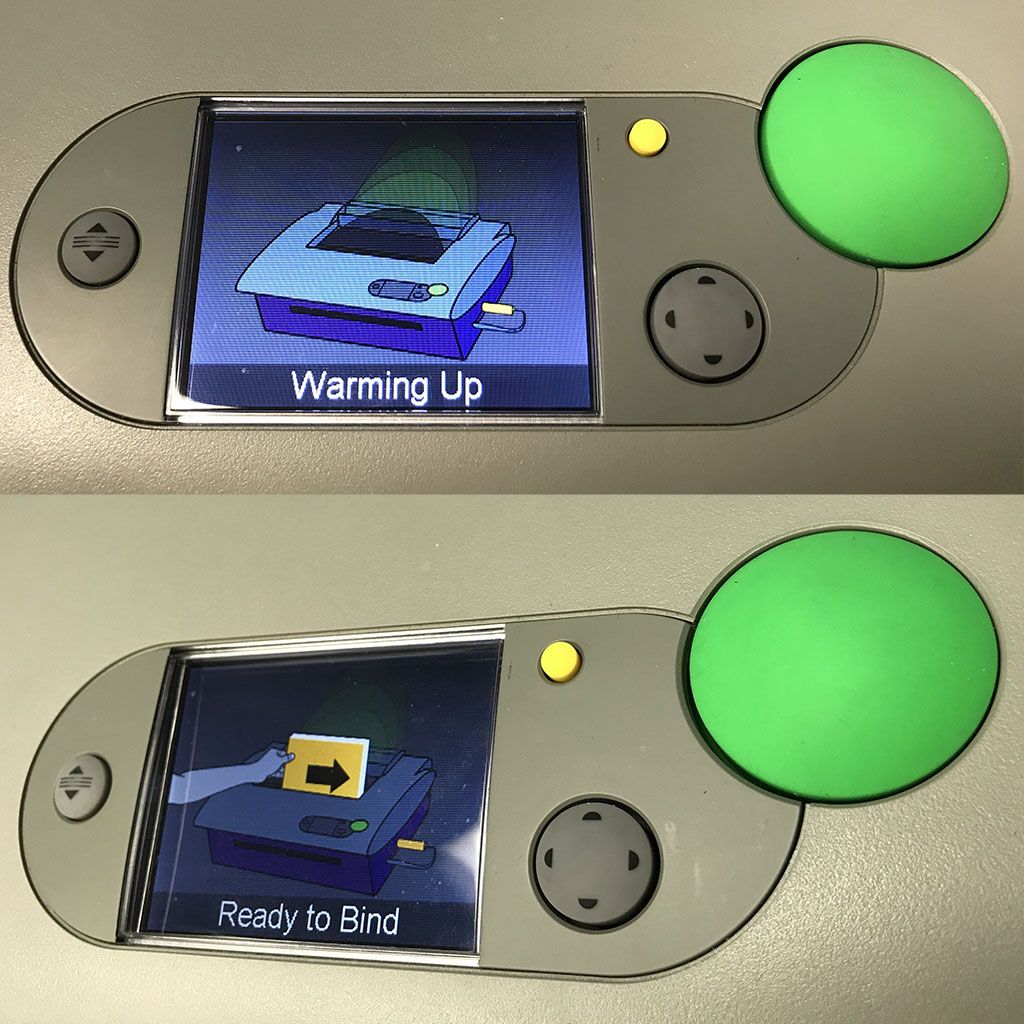
The Fastback Model 20 was designed with the operator in mind, featuring an LCD display screen that guides the users through each step using animated illustration. Extremely simple to use, the Fastback 20 binding machine automatically adjusts the settings depending on the binding strip that is being used, so you don't have to hassle with manual machine adjustments. You can even edit your tape bound books by re-heating them and either removing or inserting sheets.
One of the most important aspects of business is how you present your company to your clients, business partners, and suppliers. With professionally-bound tape books using the Powis Fastback Model 20 book binders, you can make a statement, and a striking first impression. It is perfect for offices that want to make their own documents, and can run all day long, making it a good fit for print shops who need to offer these premium-bound books to their clients.
In addition to the standard Super Strips, you can also use the Powis Model 20 with Image Blank strips, that you can customize with your own printer to offer on-demand custom branding. With the Fastback® Model 20 thermal binding machine you can create professionally bound books quickly, and easily. There is no formal training required, so everyone in your office can use the machine without worry. Just pair with the binding strip of choice, and you can start making presentations, manuals, mailers, and other documents of all kinds.
Videos
Model 20 - Hardcover book
Transcript:
In this video, you're about to see me demonstrate how to make a hardcover book. I'll be using super strip and the Fastback 20 binding machine. You're going to love how easy and intuitive this system is. Alright, let's do this. I'm going to show you how to make a beautiful, traditional hardcover book in less than a minute. So, these are our pages. We're going to add our end leaves on either side here. Put them in the machine. Just tap it to make sure it's nice and even. Put the binder strip in an...
Read More
In this video, you're about to see me demonstrate how to make a hardcover book. I'll be using super strip and the Fastback 20 binding machine. You're going to love how easy and intuitive this system is. Alright, let's do this. I'm going to show you how to make a beautiful, traditional hardcover book in less than a minute. So, these are our pages. We're going to add our end leaves on either side here. Put them in the machine. Just tap it to make sure it's nice and even. Put the binder strip in and the binding itself takes about 15 seconds. It's really quick. And as soon as it's done, I can put it in the cooling rack, to let it cool, and then once it is cooled, take it here. Go in the hard cover guide, which is really easy to use. Pull this back about an inch and align this up in the guide, and then I can just pull this paper off. Line it up really well and then just line this part up here. Then tips down. I can just take it and press it down a little bit on either side, and it's good to go, gorgeous, traditional hardcover book, totally professional and complete.
Model 20 - Image Ready Strip
Transcript:
In this video, I'm going to show you how easy it is to customize professional documents using the Fastback image strip. To demonstrate this, I'll be using the Fastback 20, Image Ready strip and the Epson workforce pro WFC 52108 jet printer. Saying that is actually a lot harder than the demonstration I'm about to do. Using image strip enables you to reinforce your credibility and professional with beautiful presentations. You can create one design that works for most of your presentations, or cus...
Read More
In this video, I'm going to show you how easy it is to customize professional documents using the Fastback image strip. To demonstrate this, I'll be using the Fastback 20, Image Ready strip and the Epson workforce pro WFC 52108 jet printer. Saying that is actually a lot harder than the demonstration I'm about to do. Using image strip enables you to reinforce your credibility and professional with beautiful presentations. You can create one design that works for most of your presentations, or customize each strip as needed. The first step is to have your in-house designer create beautiful and interesting designs for you to print. There are design templates available for download. You can find the link in the video description or visit powis.com. Once you've created your design, you'll need to print the image strip using a inkjet printer. I recommend this Epson WorkForce Pro. We like it because the quality is fabulous and the speed is good plus this printer uses high yield inks, so it uses less waste, which is great. Now I'm actually going to show you how to bind using the image strips. So, I will take a paper, whatever I want to put from the front and back my presentation, I’m gonna put it here, tap, tap here, press the green. And then I will take one of these image strips off and just put it into the machine. And I'm just going to wait for the machine to bind it just a few seconds. All right, it is ready to be put in the cooling rack. Once it's cooled, it looks like this. Got the image strip right here, and a little bit of the image on the back as well. It's super easy and fast, and it looks beautiful.
Model 20 - Easyback hardcover
Transcript:
In this video, you're going to learn how to bind a hardcover book. It's fast, it's easy, and it takes less than 20 seconds. You can do this at the Fastback 20 or the Fastback nine. All you need is binding strip and easy back hardcovers. I'm gonna show you how quick and simple it is to make an easy back hardcover. I?m gonna take my paper. All I need is a hardcover on both sides. I'm going to put it in the binder. Tap it here. Tap it here. Just to make sure it's even, press the button, insert the ...
Read More
In this video, you're going to learn how to bind a hardcover book. It's fast, it's easy, and it takes less than 20 seconds. You can do this at the Fastback 20 or the Fastback nine. All you need is binding strip and easy back hardcovers. I'm gonna show you how quick and simple it is to make an easy back hardcover. I?m gonna take my paper. All I need is a hardcover on both sides. I'm going to put it in the binder. Tap it here. Tap it here. Just to make sure it's even, press the button, insert the strip. And what's great about these hard covers is you make it up to 600 pages just with this one size and as soon as it's done binding, you just want to put it to cool for a minute. And once it's cooled, you've got this beautiful hardcover book in a couple seconds. Really, was so easy to make the pages are really sturdy in there, the binding looks gorgeous. And then if you want, you can finish it with a dust jacket. If you want, you don't have to. And then you've got your hard cover.
Expert Reviews



Hi everyone! My name is Mallory Morsa, and I am the product expert at Binding101. I have been a part of the Binding101 team since 2008, where I started out in service and sales, learning our customers' needs and how to offer truly exceptional service. After a of couple years, I moved into a role of product management that required in-depth product research, as well as training of our staff. And in my honest expert reviews, I am proud to share that extensive knowledge with you. Take a look at the product review below, which will highlight both the pros and the cons, as well as identify the ideal customer. If you have any questions or need more information, please call our customer care team at (866)537-2244. Thank you for stopping by, and please check out our Binding101 social media channels by clicking the icons above.

I RECOMMEND THIS FOR:
The Fastback® 20 from Powis is an awesome tape binding machine that I recommend for offices and shops that need to tape bind documents as frequently as every day, throughout the day, for client presentations, manual creation and so much more. If you’re looking for a Fastback tape binder that does not need to be used every day, check out the Fastback® 9 instead.
WHAT I LIKE:
What I like most about this binding machine, and tape binding in general, is how easy the machines are to use. The model 20, for example, is a heavy duty machine that can be run all day long, but you would never think that based on the simplicity; at least for me, when I think of an all-day binding machine, I think of complicated book binders that require a lot of knowledge and mechanical training. This is not the case here. Seriously, all you have to do is place your pages (cover included) into the machine, press the big green button, and insert the tape strip.
As a purple fanatic, I also love the look of the machine (check out some of my color inspiration on Pinterest). It is clean, attractive, and will fit well into any office environment. I actually think it is such a pretty piece of machinery that it will grab attention and be a centerpiece in your workroom.
And of course, the speed is a huge plus here... thermal tape strip binding is typically as much as three times faster than other traditional binding solutions, such as spiral coil and wire binding. There is no learning curve with this tape binder, and you can make as few as a single presentation in less than a minute… perfect for that last-minute client or on-the-go salesperson with a tight schedule.
If you are torn between the Model 9 and Model 20, you should also consider the fact that the Model 20 offers more versatility, allowing for use with ImageBlank™ strips that can be customized by you with any standard printer. This lets you make a presentation for a specific client, branded for them, without the high production costs of having a short-run outsourced at a print shop.
THINGS TO CONSIDER:
The price is, of course, the main concern. It can be difficult to get an amount like this approved by purchasing for the office. But when you consider the time it saves, the ease of document transportation with the lay-flat finish, and how insanely easy it is to use, the benefits may outweigh the sticker shock. That’s the only thing I have to “consider”, because I really do love this machine!
THE BOTTOM LINE:
I know that the price point of the Model 20 may cause some sticker shock, but before you turn away be sure to weigh all the benefits this machine has to offer. I am really impressed with just how easy it is to use, making it accessible by literally anyone in the office (even kids during take your kids to work day), and how much durability and production-speed it offers. It is a workhorse of a machine that will last for years, and allows for the ability to do small runs and save a lot of money in the long run.
I hope this review has helped inform you of how highly I think of this machine, and that with the information, you can make an informed decision with confidence. Thanks for reading! TTFN: Ta ta for now!
Frequent Asked Questions
Submit a New Question