We process your personal information to measure and improve our sites and service, to assist our marketing campaigns and to provide personalized content and advertising. By clicking the button on the right, you can exercise your privacy rights. For more information see our privacy notice.
Privacy Policy


Adjustable Work Table for ClipsShop CSTIDY Grommet Presses
1011.91
NewCondition
InStock
Adjustable Work Table for ClipsShop CSTIDY Grommet Presses


SWIPE FOR MORE IMAGES
- 0
- 1
- 2
- 3
- 4
- 5
- 6

Overview
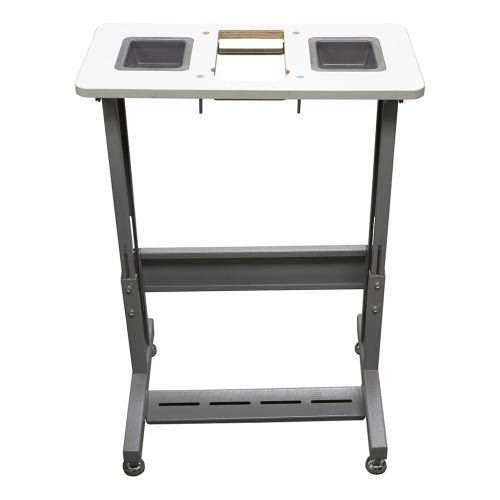
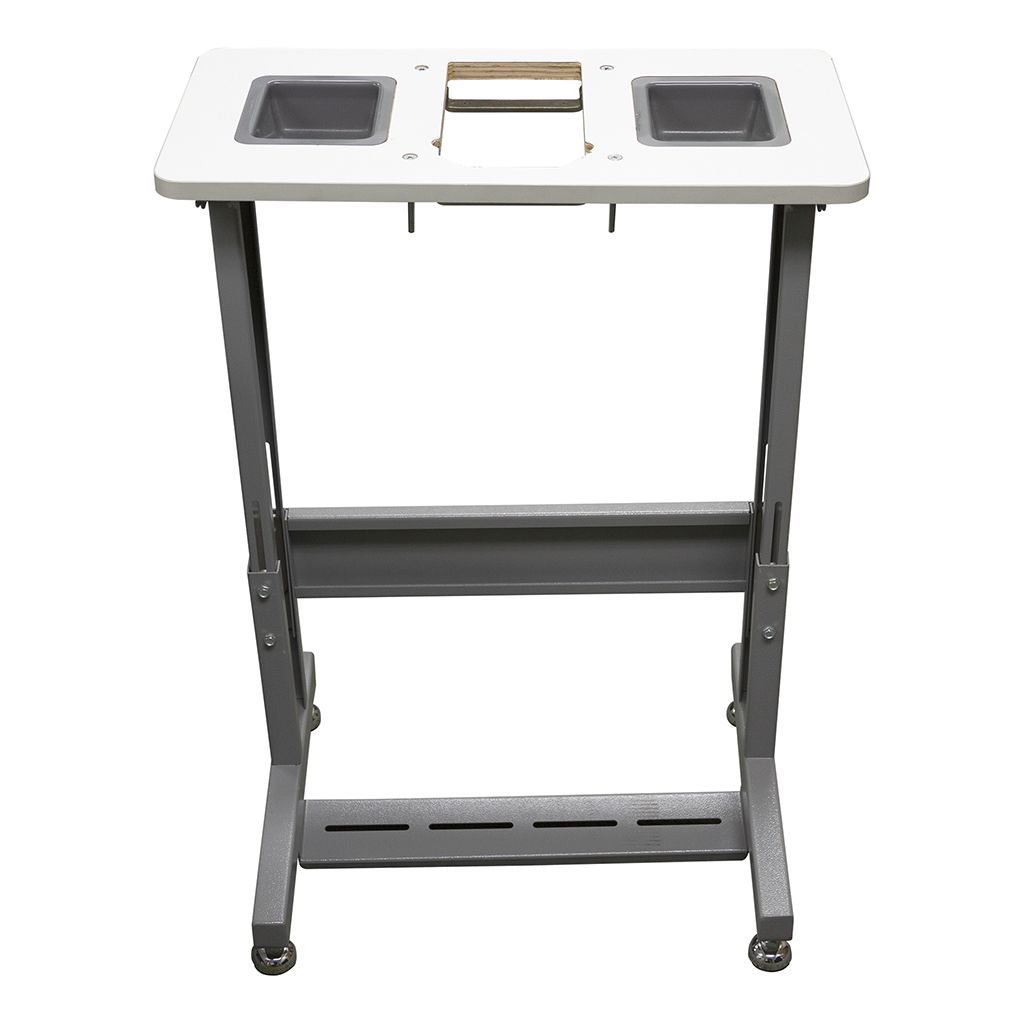
This Adjustable Work Table for ClipsShop CSTIDY Grommet Presses is designed to securely carry ClipsShop CSTIDY-41 or ClipsShop CSTIDY-51 grommet press and create a compact and convenient workstation that makes grommeting easier. A recessed table surface securely mounts and keeps the grommet press in place, it can be adjusted in 4 different set depths.
Specifications
| Item # | 04GRCSTIDY41AWT |
|---|---|
| Manufacturer | ClipsShop |
| Manufacturer Part Number | 8680211760508 |
| Dimensions | Overall: 23 ¾" W x 11 ¾" D x 25"-33" H Table Surface: 23 ¾" W x 11 ¾" D Containers: 4" W x 4 ¾" L x 1 ¾" D Footprint: 23 ¾" W x 11 ¾" |
| Assembly Required | Yes [Tools Not Included] |
| Tools Needed for Assembly | Screwdriver (Phillips), Crescent Wrench (12mm), Crescent Wrench (17mm) |
| Compatible Equipment | ClipsShop CSTIDY-41 Grommet Press ClipsShop CSTIDY-51 Grommet Press |
| Product Weight (lbs) | 27.5 |
| Shipping Weight (lbs) | 30 |
Description
This Adjustable Work Table for ClipsShop CSTIDY Grommet Presses is designed to securely carry ClipsShop CSTIDY-41 or ClipsShop CSTIDY-51 grommet press and create a compact and convenient workstation that makes grommeting easier. A recessed table surface securely mounts and keeps the grommet press in place, it can be adjusted in 4 different set depths. Setting the grommet surface of the machine level to the tabletop offers the easiest and smoothest movement of materials through the process. The height of the table can be set between 25" to 33" depending on the operator's comfort. Storage containers keep supplies within reach. For foot pedal users, the table comes with a mount for the foot pedal that can be positioned anywhere on the base bar for left, right, or center use.
Videos

How to Make Photo Blocks with Silver Linings Frames from Binding101
Transcript:
Today we're going to show you how easy and simple it is to create a Silver Linings mount frame.
The first thing you would do is peel back the release liner on your frame. Place your frame into your jig. Align your photo with the frame and tack your photo down to where the adhesive was exposed. Now, taking your roller, simply roll the picture as you are releasing the liner. Now you've got your picture mounted on your frame, simply take the safety cutter to trim the excess photo off your frame.... Read More
The first thing you would do is peel back the release liner on your frame. Place your frame into your jig. Align your photo with the frame and tack your photo down to where the adhesive was exposed. Now, taking your roller, simply roll the picture as you are releasing the liner. Now you've got your picture mounted on your frame, simply take the safety cutter to trim the excess photo off your frame.... Read More
Today we're going to show you how easy and simple it is to create a Silver Linings mount frame.
The first thing you would do is peel back the release liner on your frame. Place your frame into your jig. Align your photo with the frame and tack your photo down to where the adhesive was exposed. Now, taking your roller, simply roll the picture as you are releasing the liner. Now you've got your picture mounted on your frame, simply take the safety cutter to trim the excess photo off your frame.
And there you've got your beautifully finished mount frame.
Now the other thing on your mount frame is there is a stand that comes with the frame. Simply remove your stand from the back of the frame and screw it into the back. And there you have it so it can stand on a desk or a table. And you have a beautifully finished Silver Lining mount frame.
The first thing you would do is peel back the release liner on your frame. Place your frame into your jig. Align your photo with the frame and tack your photo down to where the adhesive was exposed. Now, taking your roller, simply roll the picture as you are releasing the liner. Now you've got your picture mounted on your frame, simply take the safety cutter to trim the excess photo off your frame.
And there you've got your beautifully finished mount frame.
Now the other thing on your mount frame is there is a stand that comes with the frame. Simply remove your stand from the back of the frame and screw it into the back. And there you have it so it can stand on a desk or a table. And you have a beautifully finished Silver Lining mount frame.

How to Make Self-Stick Photo Frame Blocks, Detailed Instructions
Transcript:
Subscribe to our YouTube for more ► https://www.youtube.com/c/binding101
These detailed instructions walk you through just how easy it is to make DIY modern photo frames using SilverLinings Self Stick Photo Mounting Blocks and the SilverLinings accessory kits.
To follow along with these instructions, you will need:
• SilverLinings Block in your choice of size
• Self-healing cutting mat
• Handheld rotary cutter
• Brayer hand roller
• Frame alignment guide
• Photo gloves
... Read More
These detailed instructions walk you through just how easy it is to make DIY modern photo frames using SilverLinings Self Stick Photo Mounting Blocks and the SilverLinings accessory kits.
To follow along with these instructions, you will need:
• SilverLinings Block in your choice of size
• Self-healing cutting mat
• Handheld rotary cutter
• Brayer hand roller
• Frame alignment guide
• Photo gloves
... Read More
Subscribe to our YouTube for more ► https://www.youtube.com/c/binding101
These detailed instructions walk you through just how easy it is to make DIY modern photo frames using SilverLinings Self Stick Photo Mounting Blocks and the SilverLinings accessory kits.
To follow along with these instructions, you will need:
• SilverLinings Block in your choice of size
• Self-healing cutting mat
• Handheld rotary cutter
• Brayer hand roller
• Frame alignment guide
• Photo gloves
• Photo to match size of your photo block
Start by placing your alignment guide (referred to as the “jig” in this video) against your photo block. Starting at the corner opposite the guide, peel the adhesive liner back a couple of inches and crease it to it stays up. Put on your photo gloves to avoid finger prints on the photo. Now take your photo and place it so that the top and left sides extend over the block and onto the guide; you will see there is a groove to allow for this. Now press the photo onto the exposed corner of adhesive. Hold the rest of your print up as you peel the remainder of the liner off the photo block. Gently roll the photo down, consecutively as you lightly use the brayer/hand roller to roll the photo from the stuck corner, outward to the opposite corner. Now roll over the print in all directions, more firmly to fully adhere. Be careful of your pressure on the edges of the frame to avoid damaging them. Next, lift the photo block up and flip it so it is face-down. Position your cutter on one edge, using the arrow guides to align it. Press down firmly and roll the cutter along the edge. Repeat that step for each edge, making sure to match up those arrow guides on each end. And you’re done!
The SilverLinings self-stick photo blocks are great for photographers with wedding, engagement, pet, and other specialties, as well as for vacation, travel and timeshare businesses, and even fine art galleries. They are also perfect for other displays, such as notices and marketing tools within medical offices – use them as a check in notice, or other important long-term signage throughout your office. Or use them for any modern display or sign for your business, organization, restaurant, etc. These photo blocks are sold in small packs of just 10, and are incredibly affordable, so are accessible for all businesses and individuals.
- - -
Buddha by Kontekst https://soundcloud.com/kontekstmusic Creative Commons — Attribution 3.0 Unported— CC BY 3.0 http://creativecommons.org/licenses/b... Music promoted by Audio Library https://youtu.be/b6jK2t3lcRs
These detailed instructions walk you through just how easy it is to make DIY modern photo frames using SilverLinings Self Stick Photo Mounting Blocks and the SilverLinings accessory kits.
To follow along with these instructions, you will need:
• SilverLinings Block in your choice of size
• Self-healing cutting mat
• Handheld rotary cutter
• Brayer hand roller
• Frame alignment guide
• Photo gloves
• Photo to match size of your photo block
Start by placing your alignment guide (referred to as the “jig” in this video) against your photo block. Starting at the corner opposite the guide, peel the adhesive liner back a couple of inches and crease it to it stays up. Put on your photo gloves to avoid finger prints on the photo. Now take your photo and place it so that the top and left sides extend over the block and onto the guide; you will see there is a groove to allow for this. Now press the photo onto the exposed corner of adhesive. Hold the rest of your print up as you peel the remainder of the liner off the photo block. Gently roll the photo down, consecutively as you lightly use the brayer/hand roller to roll the photo from the stuck corner, outward to the opposite corner. Now roll over the print in all directions, more firmly to fully adhere. Be careful of your pressure on the edges of the frame to avoid damaging them. Next, lift the photo block up and flip it so it is face-down. Position your cutter on one edge, using the arrow guides to align it. Press down firmly and roll the cutter along the edge. Repeat that step for each edge, making sure to match up those arrow guides on each end. And you’re done!
The SilverLinings self-stick photo blocks are great for photographers with wedding, engagement, pet, and other specialties, as well as for vacation, travel and timeshare businesses, and even fine art galleries. They are also perfect for other displays, such as notices and marketing tools within medical offices – use them as a check in notice, or other important long-term signage throughout your office. Or use them for any modern display or sign for your business, organization, restaurant, etc. These photo blocks are sold in small packs of just 10, and are incredibly affordable, so are accessible for all businesses and individuals.
- - -
Buddha by Kontekst https://soundcloud.com/kontekstmusic Creative Commons — Attribution 3.0 Unported— CC BY 3.0 http://creativecommons.org/licenses/b... Music promoted by Audio Library https://youtu.be/b6jK2t3lcRs
Product Reviews
Write Your Own Review
Resources
Frequent Asked Questions
Submit a New Question