We process your personal information to measure and improve our sites and service, to assist our marketing campaigns and to provide personalized content and advertising. By clicking the button on the right, you can exercise your privacy rights. For more information see our privacy notice.
Privacy Policy


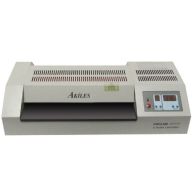
Refurbished Akiles ProLam Ultra XL 18.9" Professional Pouch Laminator - Discontinued
0
UsedCondition
OutOfStock
Refurbished Akiles ProLam Ultra XL 18.9" Professional Pouch Laminator - Discontinued
We're sorry, but we no longer sell this item.
Below are a few alternative options that may be a great fit for your needs.
If not, please call us at (866) 537-2244 for personalized recommendations.


SWIPE FOR MORE IMAGES
- 0
- 1
- 2
- 3
- 4
- 5
Please note that this listing is for a refurbished product. While not brand new, it has been inspected by our service technician and functions like-new. Refurbished products are only available while supplies last. Once inventory is depleted we can no longer offer this item.
Overview
With the professional, ProLam Ultra XL laminating machine from Akiles, you can laminate your extra-large pages without the hassle or extra cost associated with roll laminating alternatives. Built to handle up to 18.9" wide documents, you can laminate everything from a business card size pouch to a larger format map size pouches. You can even run side-by-side projects for your narrower needs, doubling and tripling the lamination project's speed.
This premium desktop pouch laminator feature 6 silicone rollers with a flex-tight spring system, along with adjustable heat and speed settings, ensuring a perfect, crystal-clear lamination, every time. You can also switch from hot to cold laminating with just the press of a button, opening up the opportunity for applications to both thermal pouches and pressure sensitive cold pouches. Two memory settings let you save your most popular settings for quick recall of repeat jobs.
Simple 3-Step Operation:
- Set the temperate and speed
- Place your document into a laminating pouch
- When the "ready" light appears, place your pouch into the machine
Specifications
| Item # | R4AKPROLULTXL |
|---|---|
| Manufacturer | Akiles |
| Operating Method | Electric |
| Power Voltage | 1200 W |
| Speed | 47" / Minute |
| Dimensions | 27 ¼" x 10 ½" x ½" |
| Warranty | 90 Day Warranty |
| Quantity | 1 |
| Size | 18.9" |
| Color | Gray |
| Operation | Electric |
| Speed | 47" / Minute |
| Heating Type | Rollers [4 Hot / 2 Cold] |
| Warm-Up Time | 6 Minutes |
| Maximum Mil Thickness | 14 Mil [or 300 / 1/8"] |
| Temperature Range | 32° - 284°F |
| Maximum Width | 18.9" Wide |
| Programmable | Yes [2 (Heat and Speed)] |
| Reverse Function | Yes |
| Auto-Shut Off | Yes |
| Shipping Weight (lbs) | 50 |
| Product Weight (lbs) | 44 |
Description
With the Akiles ProLam Ultra XL laminator, you can work with the full range of laminating pouch thicknesses, up to 14 mil. The control panel is easy to use, featuring buttons for both hot and cold lamination, so you can run thermal pouches and pressure sensitive pouches. This means it is also a great choice with businesses that use heat-sensitive materials. Adjustable speed and heat settings allow you to set the unit to the best settings for your specific application, and two memory options let you save your most common job settings for quick, one-touch recall. A patented cooling system keeps the machine cool to-the-touch, to avoid any possibility of burns. Automatic shut-off is activated by pressing the power button until the screen says "cool". After the rollers have completed the cool-down process, it will shut off. This slow cool down is important to protect the integrity and quality of the rollers themselves.
This premium desktop pouch laminator feature 6 silicone rollers, offering a crystal-clear finished laminate. With 4 heated rollers, and 2 cooling rolls, your document is exposed to even and consistent heat and cooling throughout the entire process; an essential feature for finish quality, especially when working with photos and heavy ink covered prints. The rollers are a part of a flex-tight spring system, which ensures even pressure from edge-to-edge, ensuring even further that your output is of perfect quality.
How to Use the ProLam Ultra XL
Always refer to the manufacturer-created owner manual for detailed operating instructions. The following steps have been simplified.
- Plug in the machine and press the power switch on the back of the machine to 'on'.
- Press and hold the 'power' button on the control panel.
- Set the machine to either 'hot' or 'cold' laminating, and set the speed and temperature settings for your project. You can use the guide on the machine as a starting point, though you should always test your material, as the settings may need adjusting based on your pouch and the paper type being laminated.
- When the machine reaches your heat setting, it will beep 3 times and the 'ready' light will highlight.
- Insert your document into a pouch, and insert the pouch sealed-side first into the machine.
- When done with your project, press and hold the 'power' button until the screen displays 'cool'. The machine will automatically power-off once fully cooled down.
Troubleshooting
These troubleshooting tips from the manufacturer can help with 99% of the issues customer's may encounter when laminating with the ProLam Ultra XL machine. While issues with this high quality machine are not common, sometimes an issue outside of the normal might occur. Be sure to always first refer to the owners manual for instructions on how to solve issues.
| Problem | Cause | Solution |
|---|---|---|
| Machine has no power, or rollers are not rolling | • Power cord is not properly plugged in • Power switch is off |
• Check that the power cord is properly plugged in • Check that the power switch is turned on • Contact Support |
| Excessive noise | • Operation of gears is not smooth | • Turn off the machine, and contact support |
| Bad lamination | • Laminated document is wrinkled, damp, or folded | • Adjust the temperature lower or higher and / or adjust speed |
| No increase of temperature | • Power connection | • Check that the power plug and switch is turned on • Contact support |
| Frequent curling of film | • The temperature may be too hot | • Lower the temperature |
| Edge of document is not sealed | • Document is too thick to seal the edges of the film | • Use a thinner document • Leave more space around the edges (approx. 5mm, min) |
| Emergency state | • Something may be stuck between the heated rollers • Rollers may be out of position |
• Turn off the switch and contact support |
Product Reviews
Write Your Own Review
Frequent Asked Questions
Submit a New Question